
Every digital accessibility program reaches the same tipping point. The audit is done, the report is in, and the backlog is enormous. Hundreds of issues. Dozens of affected pages. Multiple compliance deadlines are looming. And a team that is already stretched thin.
This is the accessibility backlog problem, and it is far more common than organizations want to admit. According to the WebAIM Million 2026 report, 95.9% of the top one million homepages still fail to meet basic WCAG accessibility standards.
Most of the time, teams know what is broken. The challenge is prioritizing what to fix first and building a system that can handle the backlog effectively.
This guide lays out a structured, framework-backed approach to accessibility backlog prioritization; one that protects your team, satisfies regulators, and actually moves the needle.
Why Accessibility Backlogs Are Different from Regular Technical Debt
Accessibility debt shares some DNA with regular technical debt, but it carries risks that generic tech debt does not. Every unresolved accessibility issue is simultaneously a usability barrier for real users, a potential legal liability under laws like the ADA, the European Accessibility Act (EAA), India’s RPWD Act, and SEBI’s digital accessibility circulars, and a compounding compliance gap as new deadlines approach.
The longer the backlog grows, the more expensive it becomes to resolve. Research consistently shows that fixing an accessibility issue in production costs significantly more than catching it at the design or development stage, a core argument for building accessibility in early. But for organizations that are already carrying a backlog, the question is not how to prevent the debt. The question is how to manage what already exists without paralysing the team in the process.
Why Accessibility Backlogs Keep Growing Despite Good Intentions
Before jumping to solutions, it helps to understand the four structural reasons backlogs expand faster than teams can clear them.
Automated scanners surface more issues than teams can act on: Tools are excellent at flagging potential violations at scale, but they produce volume, not priority. A scan of a large website can return thousands of results, many of which are low-impact or duplicated across templates. Without a triage layer, every item looks equally urgent, and paralysis follows. This is also where false positives in accessibility testing create hidden costs, because teams spend remediation time on issues that do not actually affect users.
New inaccessible content is created in parallel: While the remediation team chips away at the existing backlog, other teams are publishing new pages, PDFs, and components that introduce fresh violations. The backlog refills as fast as it is cleared.
There is no triage model, so everything is high priority: When prioritization is driven by whoever complains the loudest, a stakeholder request here, a legal notice there, and teams cannot maintain a coherent remediation strategy. Resources scatter and momentum stalls.
Remediation is scoped as a project rather than a process: One-time audit-and-fix cycles create the illusion of progress but do not address the underlying system. When the project ends, the debt starts accumulating again.
A Framework to Prioritize Your Accessibility Backlog
The good news is that you do not need a proprietary methodology to prioritize effectively. Two authoritative, publicly available frameworks provide the foundation: the W3C Accessibility Maturity Model (AMM) and the GSA Section 508 ICT Accessibility Policy Framework.
W3C Accessibility Maturity Model
The W3C Accessibility Maturity Model, published by the W3C’s Accessible Platform Architectures (APA) Working Group, is designed to help organizations assess their current accessibility capabilities and identify where to focus improvement efforts. Crucially, it explicitly calls for a “prioritization and grooming system for accessibility defects” as a hallmark of mature accessibility programs. This is not a nice-to-have. It is a defining characteristic of organizations that sustain accessibility over time rather than lurching from audit to audit.
The AMM frames accessibility not as a checklist to complete, but as an organizational capability to build, which reframes the backlog from “a list of things we failed to do” to “a structured improvement pipeline.”
GSA Section 508 ICT Accessibility Policy Matrix
The GSA’s IT Accessibility Policy Framework introduces a practical scoring model for prioritizing remediation based on two intersecting factors: the importance of the asset to accessibility outcomes and the sufficiency of existing accessibility coverage. Assets that score high on importance and low on sufficiency are flagged as “Critical”, requiring immediate attention. Assets that score lower on both dimensions can be deferred.
While this framework was developed for federal ICT policy, its underlying logic applies directly to any web accessibility backlog: score each item by its impact and its current coverage gap, and sequence remediation accordingly.
Applying Both: A Three-Bucket Triage Model
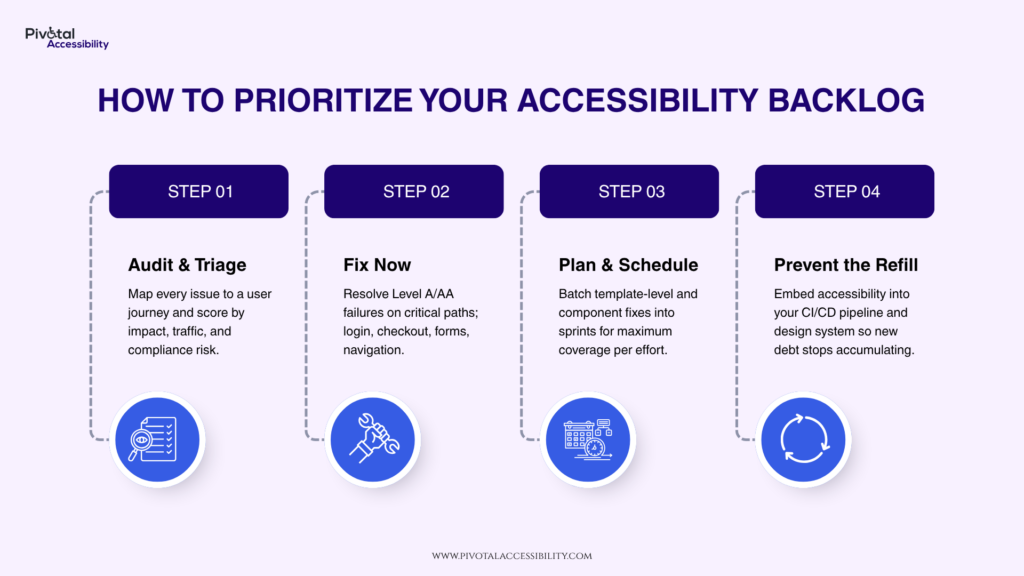
Drawing from both frameworks, a practical approach is to sort your backlog into three buckets before writing a single line of remediation code.
Fix Now: Issues that block access to critical user journeys, appear on high-traffic pages, and carry direct legal or compliance risk. Examples include inaccessible login flows, broken keyboard navigation on checkout pages, missing form labels, and low-contrast text on primary content areas. These are your WCAG Level A and AA failures on mission-critical paths, as defined by WCAG 2.2.
Plan: Issues that affect secondary journeys or less-trafficked content, require moderate development effort, or are part of component-level patterns that can be fixed once and resolved across multiple pages simultaneously. Template-level fixes belong here as a single fix can resolve hundreds of instances.
Defer or Remove: Archived content, legacy PDFs that are no longer actively distributed, and pages with negligible traffic. Before deferring, ask whether the content can simply be removed. As accessibility experts at the University of Washington have noted through their “Think Before You Create a PDF” initiative, the answer is often yes, and removing content is faster and cheaper than remediating it.
What to Fix First: Critical Paths, Not Random Pages
One common backlog mistakes is remediating pages in the order they appear in a spreadsheet. Or tackling easy wins first to show progress metrics. Neither approach aligns remediation effort with user impact.
Instead, map your remediation to the journeys users depend on most. For an e-commerce site, that means the product page, cart, and checkout flow. When it comes to a financial services firm, it means account login, transaction history, and customer support contact. For a healthcare provider, it means appointment booking and patient portal access. These are the pages where an accessibility failure is not merely inconvenient; it is exclusionary.
A web accessibility audit that maps issues to user journeys rather than just page URLs gives you the right starting point. From there, layer in WCAG conformance level, Level A failures first, then Level AA, and traffic data from your analytics platform to confirm where users actually spend time.
This is also where component-level thinking delivers the highest return. If your navigation component fails a keyboard accessibility check, fixing it in the design system resolves the violation across every page that uses it in a single sprint. A keyboard accessibility audit of shared components is often the highest-leverage remediation investment available.
The Prevention Layer: Keeping the Backlog from Refilling
Triage clears what exists. Prevention stops the refill. Without both, you are running on a treadmill.
The most effective prevention strategy is shifting accessibility left in the development lifecycle, making it part of how work is defined and accepted, not a post-launch check. Practically, this means three things.
First, add accessibility acceptance criteria to user stories. Any story that touches a UI component should include a testable accessibility requirement, for example, “The form field must have a programmatically associated label that is announced correctly by NVDA on Windows and VoiceOver on macOS.”
Second, integrate automated accessibility checks into your CI/CD pipeline. Tools like Axe-core can catch a defined subset of WCAG failures on every pull request, before code reaches production. This does not replace manual testing; automated tools catch roughly 30–40% of WCAG issues, but it prevents the most common regressions from entering the codebase undetected.
Third, build accessibility into your component library and design system. If every button, form, modal, and navigation pattern in your design system is accessible by default, new product development inherits that accessibility rather than having to retrofit it. This is the leverage point that separates organizations with growing backlogs from organizations with stable, manageable ones.
Building a Defensible Remediation Record
In a compliance-sensitive environment and given the pace of regulation in 2026 across ADA Title II, the EAA, India’s IS 17802, and SEBI’s circulars, the ability to demonstrate structured, good-faith remediation effort matters as much as the remediation itself.
Document your triage decisions. Record why high-impact items were prioritized, what criteria were used, and what the remediation timeline looks like. An accessibility statement that honestly reflects your current conformance level and your remediation roadmap is both a legal risk management tool and a signal of organizational commitment.
This documentation also protects your team. When stakeholders or legal counsel ask why certain issues have not yet been fixed, a structured triage record answers that question clearly and demonstrates that prioritization was driven by user impact and risk, not negligence.
The Mindset Shift That Makes This Sustainable
The organizations that successfully clear their accessibility backlogs, and keep them clear, share one thing in common. They stopped treating accessibility as a project and started treating it as a discipline.
Projects end. Disciplines compound. A team that has internalized accessibility triage, integrated prevention into its workflows, and built remediation into its sprint cadence does not need a heroic backlog-clearing effort every twelve months. It maintains a living, manageable pipeline that reflects the organization’s actual accessibility posture in real time.
The W3C Accessibility Maturity Model frames this well: the goal is not a perfect audit score at a point in time, but the organizational capability to produce and sustain accessible products over the long term. That capability starts with knowing how to prioritize, and protecting the team that does the work.
Need help assessing your current accessibility backlog and building a prioritized remediation roadmap? Pivotal Accessibility’s audit and strategy services can help you get from a backlog to a blueprint, without burning out the people who make it happen.